
:format(webp))
:format(webp))
At some point, almost every company introducing AI reaches a stage where teams ask themselves: why isn’t this as helpful in daily operations as we thought it would be?
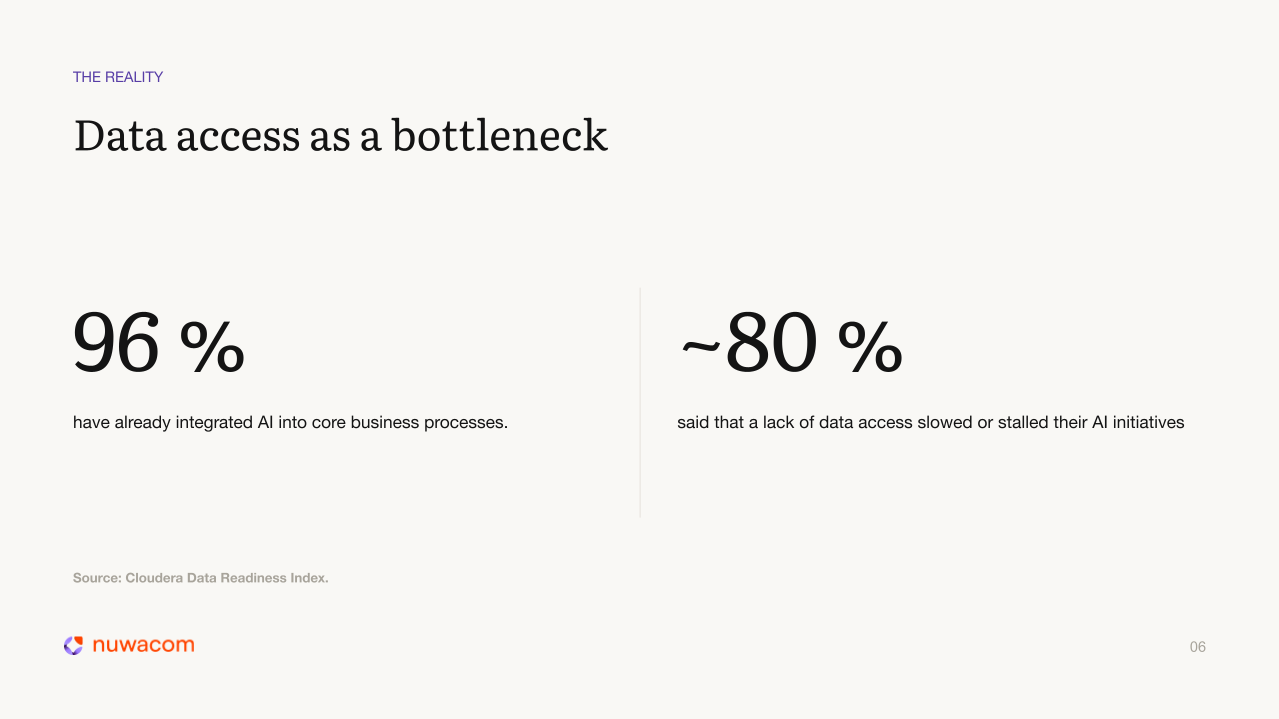
The models are great and fully sufficient for 99% of use cases. What is missing is something far more fundamental: access to the right information. In a survey of IT leaders conducted by Cloudera, nearly 4 out of 5 respondents stated that a lack of data access is stalling their AI initiatives.
This has very little to do with the technology itself, and everything to do with the architecture built around the AI. While most organizations already successfully access static knowledge, they lack the connections that allow AI to pull real-time data from enterprise systems.
That is what the Model Context Protocol (MCP) was built to address. This open standard makes it possible to connect AI platforms with external systems.
Context is King
The Boston Consulting Group developed a framework that illustrates this idea perfectly. According to their 10-20-70 rule, only 10% of AI success depends on algorithms. Another 20% is a matter of data and the tech stack. A massive 70% is determined by people, processes, and context. In other words, the organizational framework is far more critical than it appears at first glance.
This means the real leverage does not lie within the model itself, but in the “Harness Layer.” This is the layer that systematically harnesses organizational context and securely couples it to the AI. Without this layer, AI remains an isolated tool that answers based on probabilities rather than facts.
Focusing primarily on introducing the latest, most powerful models will not solve the problem. The best model is of little use if it remains blind to critical company information.
“Anything the AI cannot access simply does not exist for it.”
With MCP, numerous systems can be connected in a standardized way, allowing employees to access information from scattered sources directly within their AI workspace.
What is MCP?
MCP was developed by Anthropic as an internal tool and introduced to the public in November 2024. Just a few months later, in March 2025, OpenAI announced they would also support the standard.
Since then, MCP has been adopted by the industry at a rapid pace, leading to its inclusion in the Linux Foundation to establish a vendor-neutral governance environment for the standard.
Today, in 2026, there are nearly 9,400 publicly available MCP servers. The SDK is downloaded 97 million times a month, and Gartner estimates that 75% of all API gateway providers will offer MCP features by the end of the year.
MCP is a standardized protocol that gives AI models structured access to external systems. You can think of MCP as a toolbox for the LLM. Without it, the model cannot answer a question like “What are my open Jira tickets?”: it has no access to Jira, does not know the data, and in the worst-case scenario, it will hallucinate an answer or default to generic statements.
With MCP, the model can independently call a Jira MCP server, query the current data using the provided tools, and deliver an evidenced, correct answer in real time.
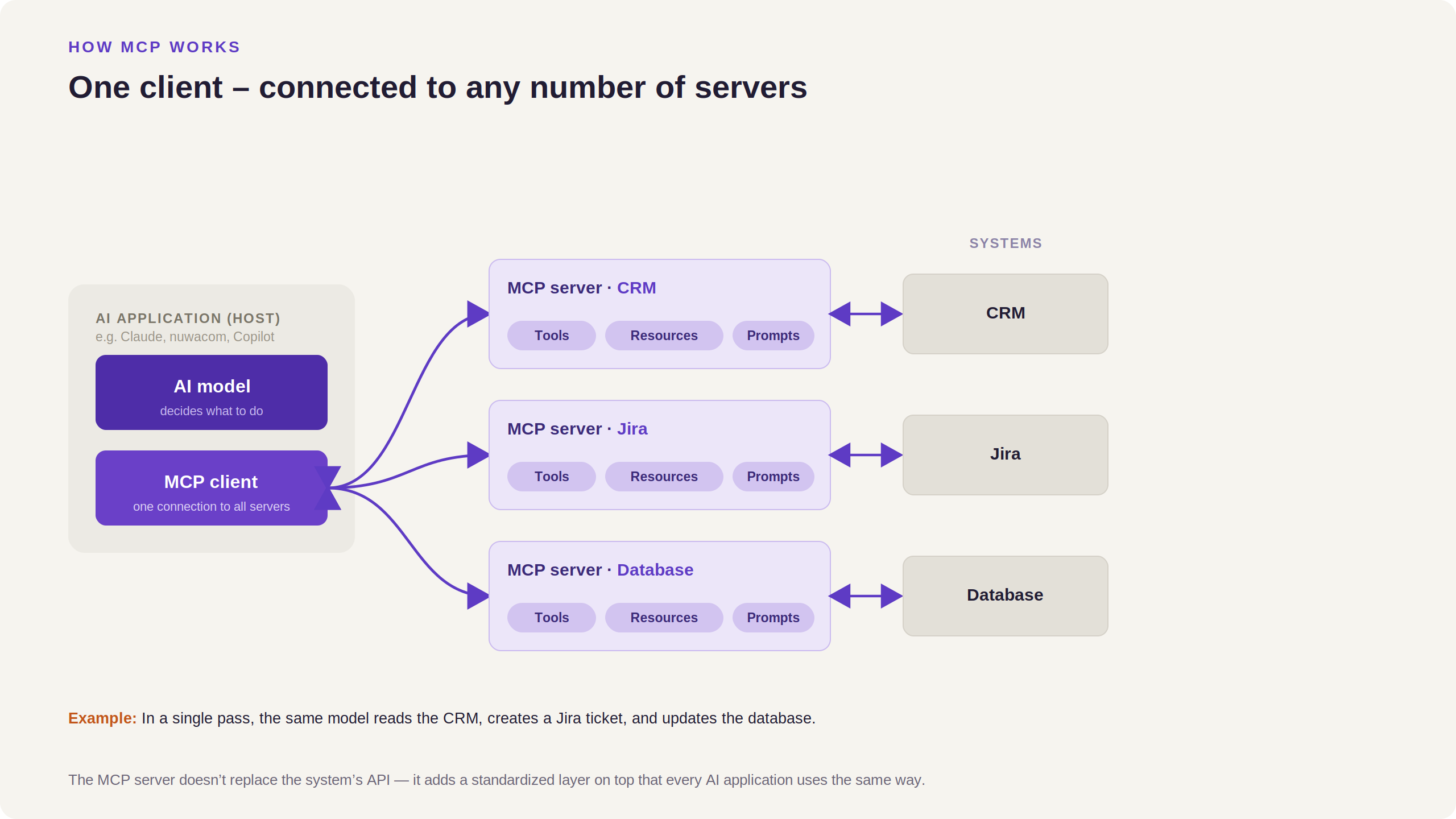
The architecture behind it is remarkably simple: an MCP Client (your AI platform) connects to any number of MCP Servers (your external systems). The same model can read from the CRM, create a Jira ticket, and update a database in a single query.
RAG and MCP: Two Complementary Approaches
For many who already use AI, this raises a valid question: how does MCP differ from the approach we currently use to retrieve knowledge?
Usually, RAG (Retrieval-Augmented Generation) is the method in place.
Both approaches solve different problems. In practice, many companies pursue a hybrid approach to enjoy the benefits of both. They are both core pillars of the Harness Layer. The key is knowing which approach fits best for which scenario.
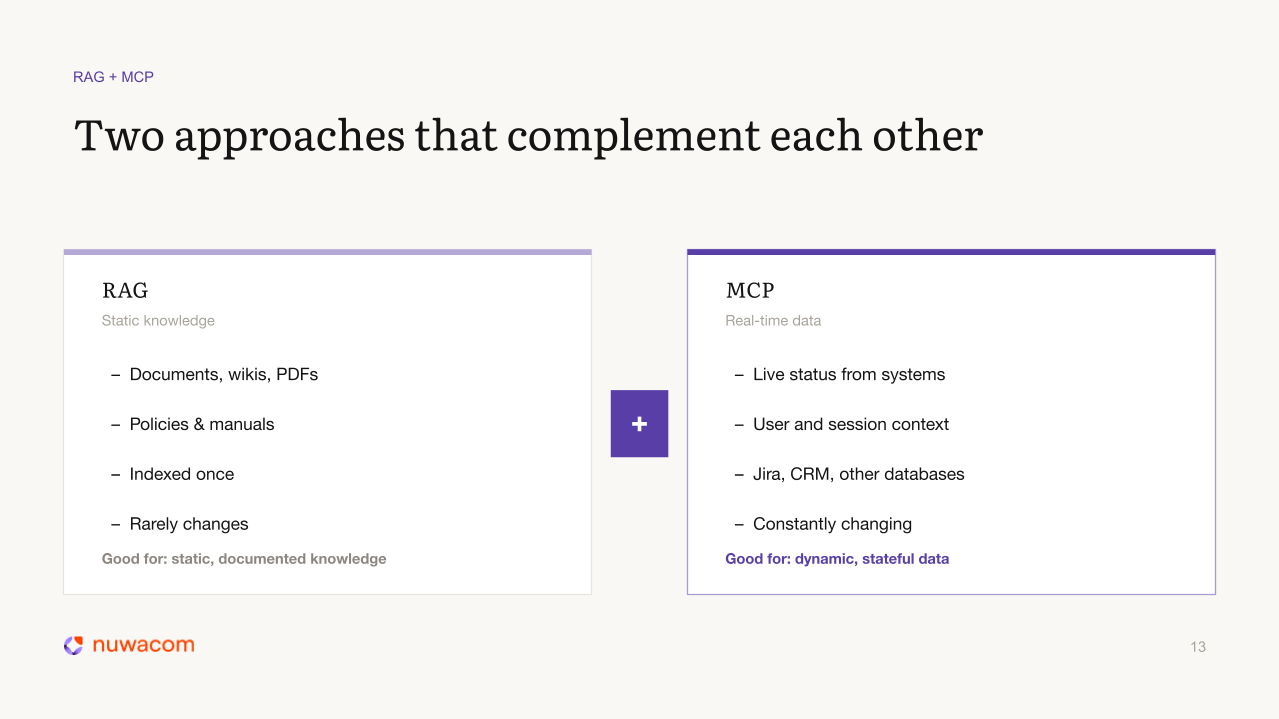
RAG is ideal for stable, well-documented knowledge: process manuals, guidelines, FAQs, onboarding documents. Data that is indexed once and rarely changes. If someone asks “What is our vacation policy?”, RAG is the right tool.
MCP is the better choice for state-dependent, constantly changing data: CRM entries, ticket statuses, inventory levels, calendar entries, feature deployment statuses. If someone asks “What is the current status of this deal in our CRM?”, this only works using MCP.
Another limitation to keep in mind: the larger a RAG knowledge base becomes, the more retrieval accuracy tends to decrease.
For dynamic data, a direct MCP query consistently delivers better results.
Companies that combine both approaches get the best of both worlds: institutional knowledge from RAG, and live system context via MCP.
Live Demo: Querying To-Dos on Notion
In our webinar MCP in Practice, our Solutions Engineer Finn Waldhofer demonstrated live within nuwacom what is possible thanks to an MCP connection.
The setup was simple: connect the Notion MCP once and ensure it was activated as a source in the chat. After that, he could query his current to-dos in real time.
The AI model recognized which tool it needed to use, sent the request to the Notion server, retrieved the data, and outputted it as a structured response. For the user, very little changes compared to other AI queries.
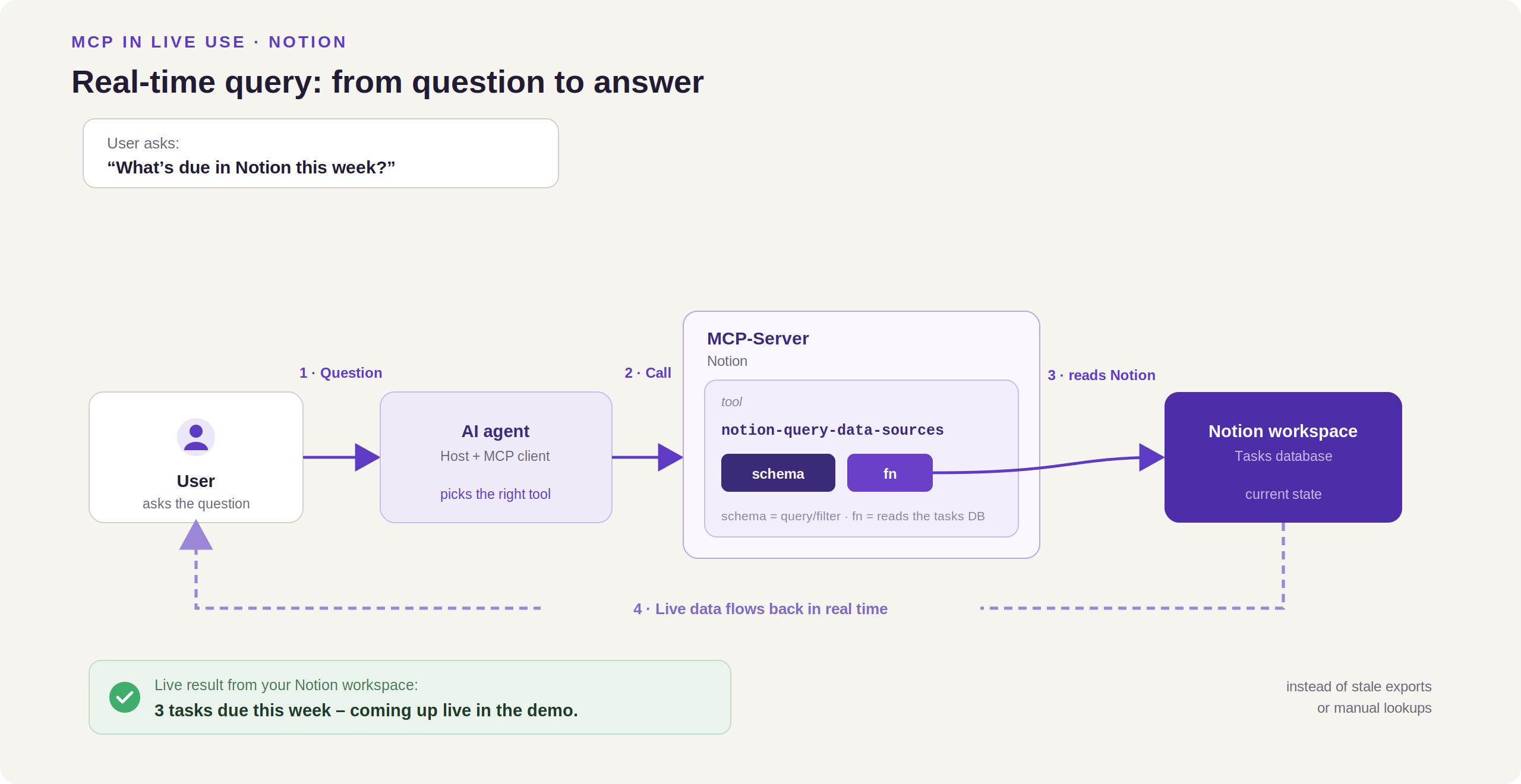
Behind the scenes, however, a real-time query runs across system boundaries. This allows users to continue working within the platform without constantly switching between systems. While only Notion was connected in the demo, there is virtually no limit to the number of integrations. For example, to-dos could be further enriched with information from the inbox, Jira, Trello, and other systems.
All in a single query. And with MCP, you are not limited to just querying.
MCP Writes, Updates, and Creates
MCP is not a read-only protocol. It works bidirectionally. This means that as long as the correct permissions are granted, users can not only query information in real time but also write to enterprise systems.
A simple example is SharePoint. Many generate documents using AI, only to manually copy the content into SharePoint afterward. With MCP, you can eliminate this step. Instead, you can instruct the AI directly to create the document in SharePoint. The AI creates it, formats it, and it is updated directly within the ongoing conversation.
The same logic applies to other systems connected via MCP. Creating tickets, updating entries, drafting and saving emails, adjusting documents—all of this becomes possible without leaving the central AI interface.
Four MCP Use Cases for Quick Implementation
With so many new possibilities opened up by a new standard, where do you start? In our webinar, we discussed four use cases where MCP helps solve daily workplace challenges.
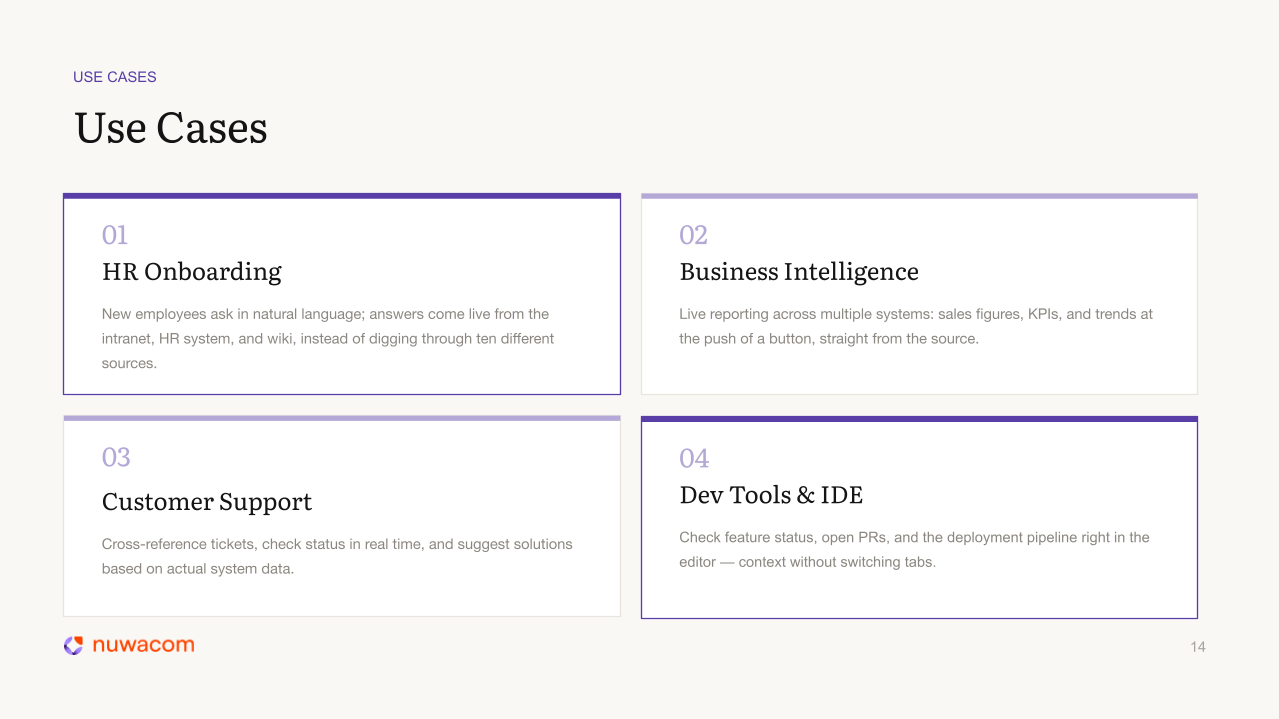
1. HR Onboarding New employees typically spend a lot of time searching for information across various systems to get an initial overview. This can quickly become overwhelming. With MCP connections to the HR system, wiki, and intranet, new colleagues can chat with an onboarding assistant and receive answers directly from live sources, without having to constantly log into numerous new systems.
2. Business Intelligence Atlassian noted in the “State of Teams 2025” report that employees spend an average of 25% of their working hours just searching for information. MCP helps here by enabling simultaneous live queries from different systems: sales systems, CRM, ERP, and more. This allows employees to access all necessary data for BI reports directly within the AI platform and draft reports.
3. Customer Support Customer service teams also know the pain of gathering information all too well. Denis Möller, our Head of Customer Success at nuwacom, now uses MCP daily. With a single query, he gets the email history, CRM data, and relevant Slack messages before heading into customer calls. The AI aggregates what has been discussed, what is open, what was last communicated, and creates a contextual draft response.
“It is truly brilliant how you can bring together bits of information from the most diverse sources and get an answer that takes the entire business history with this customer into account.”
4. Developer Tools Using MCP, developers can query open pull requests from GitHub, pipeline statuses, and relevant messages from tools like Slack directly from their development environment. They can also update Jira tickets directly without any context switching.
Three Ways to Deploy MCP: Chat, Agents, Workflows
As an open standard, MCP is not limited to a single interaction mode. For most, the journey begins in chat, but even greater leverage is created where live data flows into agents and workflows thanks to MCP.
The decisive difference between the three paths is the question: how involved are employees, and how much should the AI decide on its own?
Chat: You query information for yourself and work directly with it. This mode is ideal when only one person needs access at that moment—for example, to prepare for a customer meeting.
Agents: When MCP is used with agents, what employees review shifts. With MCP, agents can make autonomous decisions based on real-time data. You then only review the final result, not every individual step.
Workflows: MCP becomes a fixed step within an automated process triggered by an event. nuwacom co-founder Sascha, for example, uses a workflow that is triggered as soon as a new email arrives. The message is analyzed, the internal knowledge base is searched for relevant context, and a draft response is placed in the inbox via the Outlook MCP. Sascha is notified and only reviews the drafts before sending them.
MCP supports all three types of integration natively.
Understanding Risks and Preventing Them Correctly
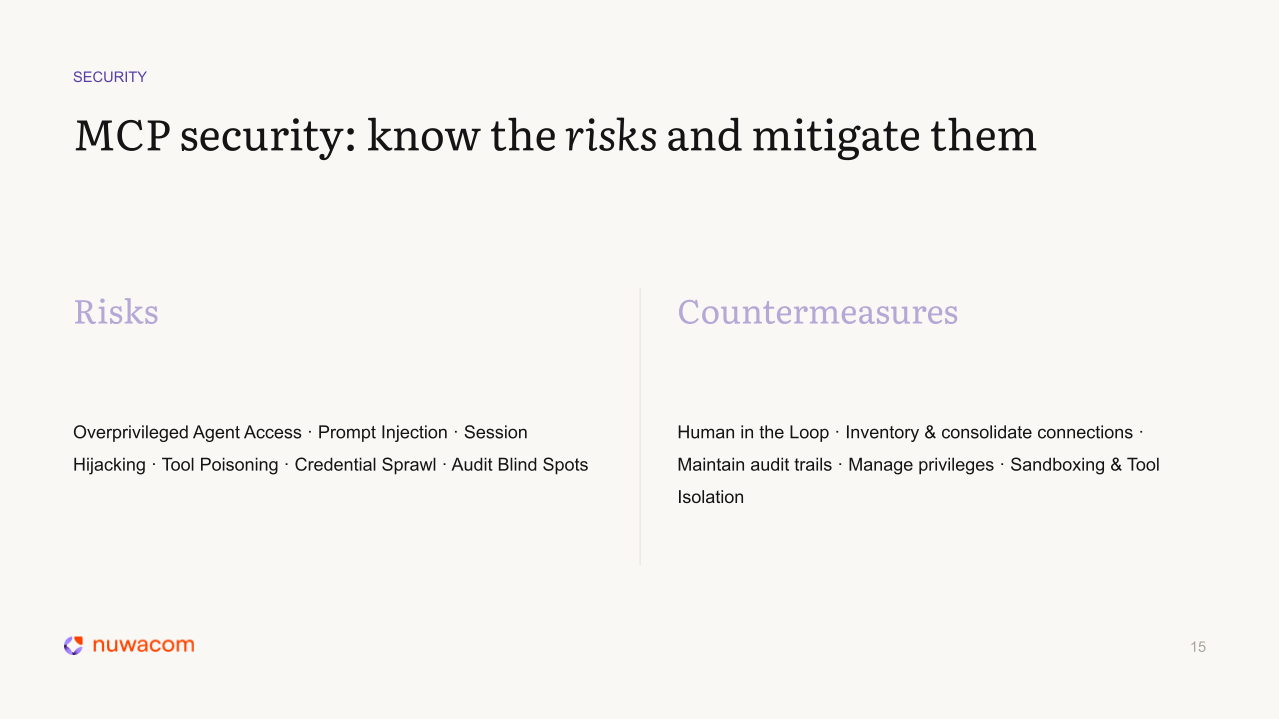
MCP expands what AI can do and with it, the attack surface if it is not carefully configured. Because MCP does not just enable read access, but can also actively write to external systems. One of the greatest risks here is Overprivileged Agent Access—agents receiving access rights they should not have.
According to Teleport’s State of AI in Enterprise Infrastructure Security Report, this is precisely one of the biggest security risks: companies with overly broad access rights experience 4.5 times as many security incidents as those that consistently rely on the least-privilege principle.
Connecting too many MCP servers to agents without restrictions risks unintended actions being executed, including the deletion of data, if the agent receives unclear instructions.
The countermeasure is clear: manage access rights carefully, define exactly what each MCP connection is allowed to do, and maintain a human-in-the-loop approach for high-consequence actions.
In addition, standard security measures apply: test in sandbox environments first before deploying MCP connections live, session monitoring, audit logging, and credential management.
None of this is MCP-specific, but the consequences are more far-reaching because MCP allows AI to write to other systems.
Choosing the Right Platform
MCP is a vendor-neutral standard, and most major AI platforms support it. However, it is not just about whether the standard is supported, but primarily what happens to the data in the process.
nuwacom is specifically designed for enterprises that process sensitive data without routing it through US hyperscalers. nuwacom is hosted on European infrastructure, including the sovereign cloud environments of Stackit and IONOS. This means data does not leave Germany, and the platform is GDPR-compliant by design.
Furthermore, nuwacom brings the organizational layer that mainstream tools lack. It enables centralized governance out of the box, making it easy to regulate who can use AI for what. Additionally, nuwacom offers model-agnostic flexibility, a collaborative architecture, and a skills system that allows teams to codify and share knowledge alongside MCP connections.
Outlook: WebMCP and Agents Executing Transactions
Google announced WebMCP earlier this year, an MCP server that allows AI agents to interact with websites, query data, and even complete transactions.
Although WebMCP is still in beta, it is not hard to imagine the possibilities. If agents can interact with websites, this would allow AI users to fill out forms, book travel, and do everything else possible on the web directly from their familiar AI platform.
WebMCP would massively expand the area of the web with which AI can productivly interact.
The Bottom Line
MCP opens up new possibilities for connecting AI with external systems and allows companies to bridge the gap between their own systems and the answers the AI can provide.
It transforms AI from a smart assistant working with static knowledge into an operational system that can query, act, and update across actual enterprise infrastructure in real time. Thanks to MCP, employees can complete more of their work within the same platform without copy-pasting and constant context switching.
Want to try it yourself? Connect your first MCP server in nuwacom with a free trial license at nuwacom.com.