Every presentation starts from zero. That is the problem.
Think about the last presentation your team built with AI. You typed a prompt. The tool generated slides. Then someone spent the next hour dragging in the right logo, swapping the fonts, rewriting every headline to sound like your company, and hoping the data on slide seven was still accurate.
That is the reality for most teams using AI slide tools in 2026. The tool produces something that looks like a presentation, but it knows nothing about the organization behind it.
The problem is not the AI. The problem is that the AI does not know your company.
What is an on-brand AI presentation?
On-brand AI presentation tools generate slide decks that automatically apply a company's logo, colors, fonts, tone of voice, and internal knowledge, eliminating the manual reformatting that follows most AI-generated outputs.
What does on-brand AI slide creation look like in practice?
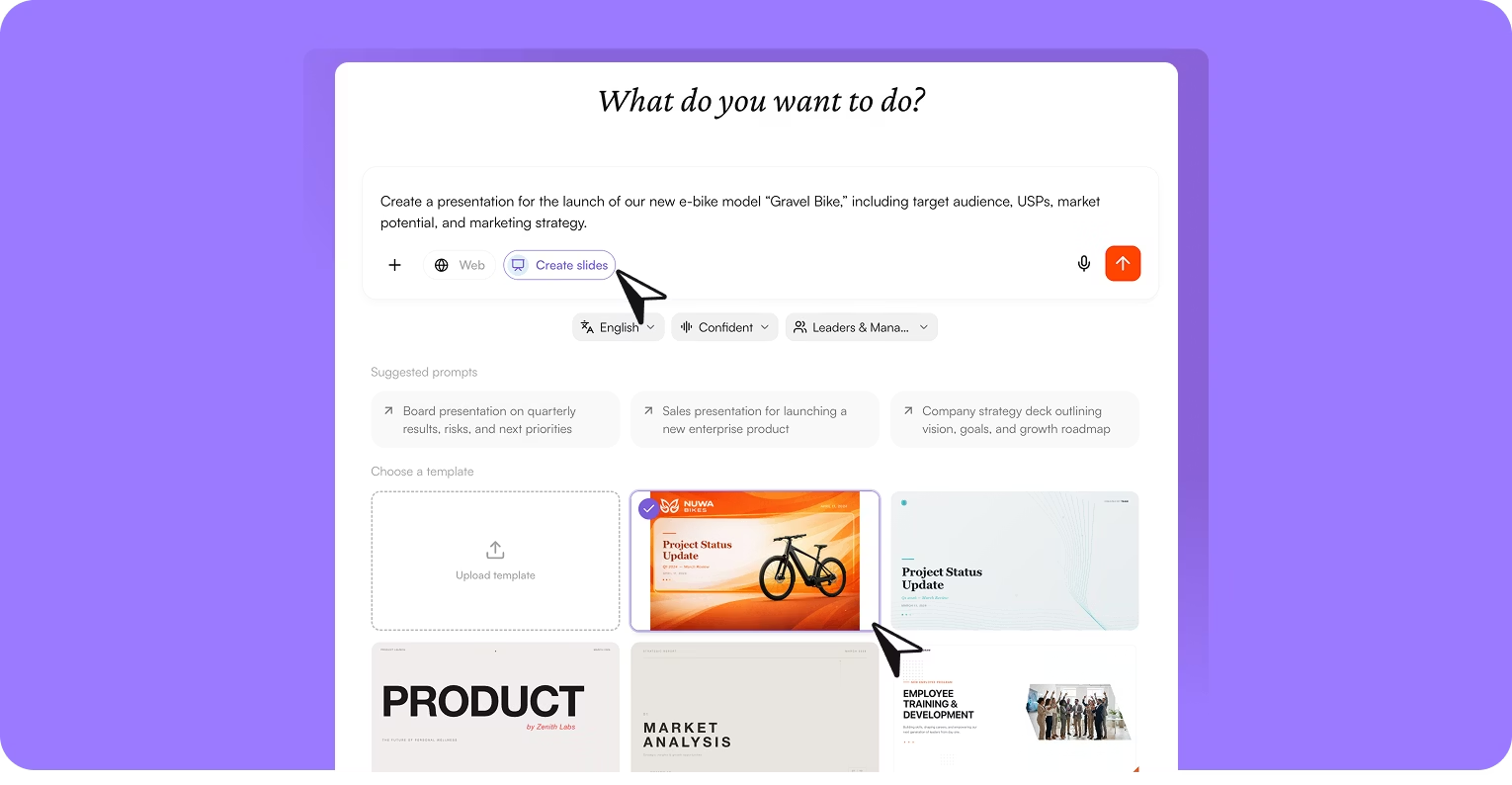
Brand Kit, uploaded once. Logos, colors, fonts, tone of voice, and layout preferences. Stored and applied to every output automatically.
Your templates or built-in templates. Upload your company's presentation templates to define how content should look and feel.
Slides generated from company knowledge. The AI draws from your company's Corporate Brain — documents, meetings, decisions, and shared data — when generating content.
Set voice, audience, and language before generating. Define who the presentation is for, what it should accomplish, and in which language. The AI structures and writes content accordingly.
Real-time collaborative editing. Multiple team members can work on the same presentation simultaneously. Edits appear in real time. No emailing versions back and forth.
Export to PowerPoint or PDF in one click. No lock-in. No proprietary formats. Your team can present from PowerPoint as usual.
How to spend less time creating presentations with AI
Users of AI-powered presentation tools report saving a median of 3 hours per week, with an average of 5.6 hours reclaimed (Beautiful.ai Productivity Study, 2026). A study published in Science found that ChatGPT reduced time spent on professional writing tasks by 40% while improving output quality by 18% (Noy & Zhang, Science, 2023).
Impressive numbers. But they obscure a deeper problem.
According to Federal Reserve Bank of St. Louis research, knowledge workers using generative AI save an average of 5.4% of their work hours—roughly 2.2 hours per week (St. Louis Fed, 2024). Yet a Microsoft Research study found that many knowledge workers spend less time on critical thinking when using AI tools and often accept AI-generated content without verification (Microsoft Research, 2025).
A faster first draft that still requires extensive rework has not actually saved anyone meaningful time.
Speed without brand awareness creates more work, not less. The tool does not know your company, so it cannot produce anything that sounds like your company.
AI presentation tool vs. presentation feature in an AI operating system
The pattern is predictable. You open a standalone AI slide tool, type a brief, and get a polished-looking set of slides. Then the real work begins:
Generic output. The colors are wrong. The fonts do not match. The logo is missing or misplaced.
No company context. The AI does not know what your company sells, who your customers are, or what projects are active. You paste in every piece of context manually.
Disconnected from other work. Slides are created in one tool, documents in another, images in a third. Teams export, reformat, and copy-paste between platforms.
Constant rework. Because the AI does not know the brand or the context, every generated slide requires manual correction before anyone would present it.
The core issue is structural. Standalone AI slide tools treat every presentation as a blank-slate task. They do not accumulate knowledge about the company over time, and they do not connect to the systems where company information lives.
Why do AI presentations need company knowledge to work?
On-Brand Slides is one of several AI Apps inside the nuwacom AI operating system. It works alongside Images and Workflow Builder, all connected through the same company knowledge base. That integration is the point.
The structural difference comes down to what nuwacom calls the Three-Layer Context Framework:
Foundation: Company-wide information. Documents, meeting notes, decisions, and shared knowledge. Everything your organization has discussed, decided, or documented feeds into the AI's understanding.
Structure: Playbooks and processes. Your pitch formats, reporting templates, quarterly review structures, and standard operating procedures. The AI does not guess your format — it follows it.
Personality: Tone of voice and style. Your brand voice, approved language, preferred phrasing, and communication standards. The AI writes the way your team writes.
These three layers mean that every presentation the AI generates reflects who you are, how you work, and what you have decided — not just what someone typed into a prompt five seconds ago.
How does nuwacom compare to other AI presentation tools?
Standalone AI slide tools generate presentations from prompts. nuwacom generates presentations from company knowledge. That is the difference between a generic first draft and a presentation your team can actually use.
Feature | Standalone AI presentation tools | nuwacom on-brand slides |
|---|---|---|
Brand Kit integration | Limited or manual | Upload once, applied everywhere |
Company data access | None — prompt-based only | Connected to meetings, docs, decisions |
Template support | Basic built-in only | Upload your own or use built-in templates |
Integrated editor | Separate export/import | Built-in, edit in place |
Export formats | Varies | PowerPoint, PDF — one click |
Context memory | None between sessions | Corporate Brain remembers everything |
Real-time collaboration | Basic sharing | Full real-time co-editing |
Data sovereignty | Varies, often US-hosted | 100% EU-hosted, GDPR compliant |
Works with images, docs, workflows | No — separate tools | Integrated in the same workspace |