What is the best way to create on-brand documents with AI?
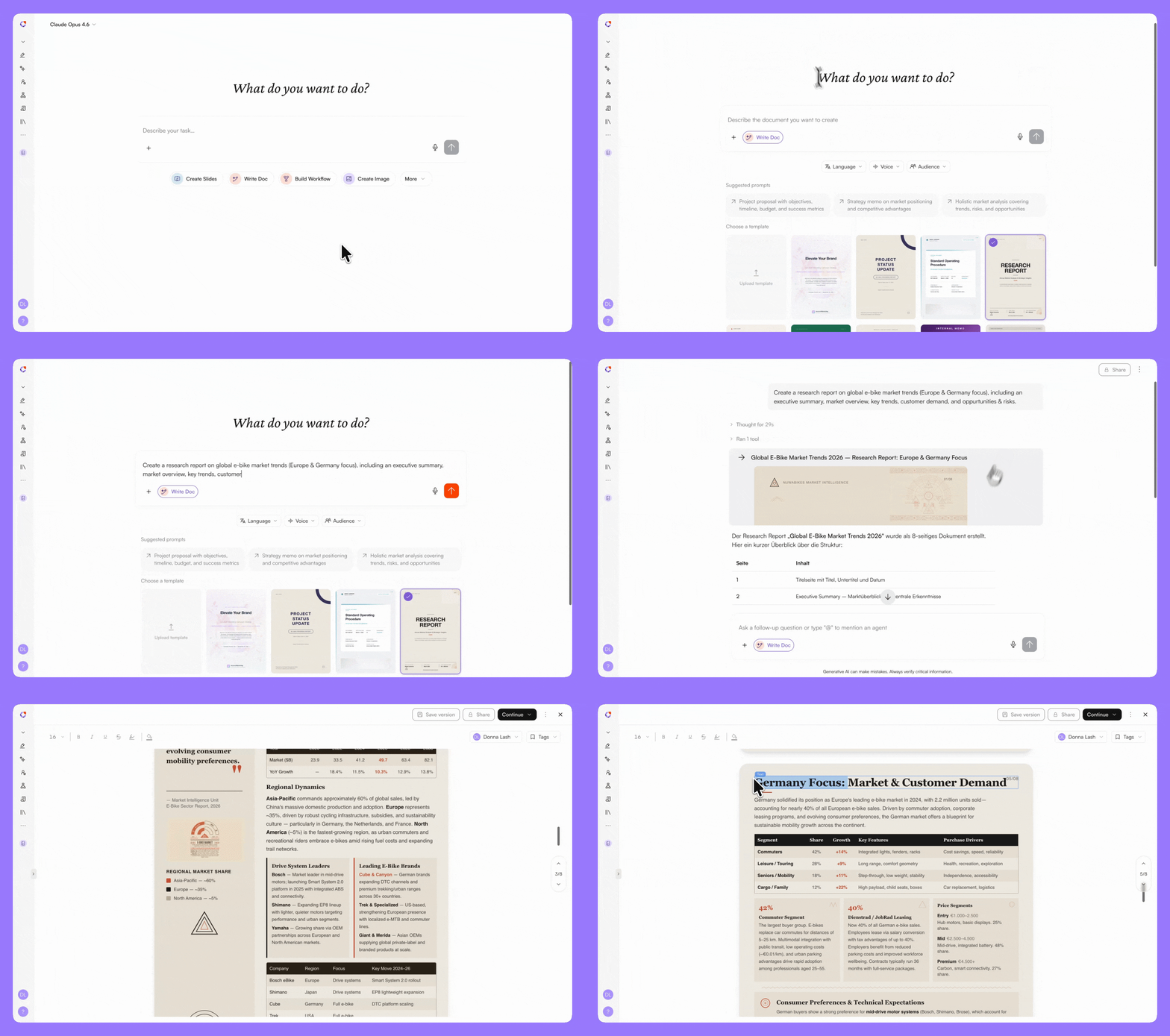
The best way to create on-brand business documents with AI is to generate them inside the same system where your team already writes, plans, and communicates — so every document starts with the right context, follows your corporate design, and is ready to share the moment it is created.
Most AI writing tools produce text. They do not produce a finished business document: one that matches your company's templates, speaks to your intended audience, and uses data your team actually trusts. That gap between raw AI output and a usable business document is where teams lose hours every week.
The problem is consistent across roles and industries. A sales proposal that requires 40 minutes of reformatting. An HR policy document that references outdated guidelines because the AI had no access to current ones. A client report assembled from three different tools, none of which share a common style guide. The issue is not that AI cannot write — it is that most AI tools know nothing about the company they are writing for.
The difference is not speed. It is starting point. One tool starts from a blank prompt. The other starts from your entire company.
How to spend less time creating business documents with AI
AI writing tools have become fast. They have not become useful for document creation in a business context.
The issue is structural. When a marketing manager needs a product brief, they do not need 800 words of generic prose. They need a document that follows their company's brief template, references the correct product data, uses the approved tone of voice, and is formatted so that every colleague who opens it recognizes it as theirs. No consumer AI writing tool delivers that.
The data confirms this gap:
A 2025 Forrester report found that 45% of those who experienced AI underperformance said missing organizational context was the primary cause — leading teams to spend significant time reformatting and correcting AI outputs.
Furthermore, McKinsey Global Institute found that knowledge workers spend nearly 20% of their workweek — roughly one full day — searching for internal information or tracking down colleagues who can help with specific tasks (McKinsey, "The Social Economy"). Documents created outside the team's shared context contribute directly to that lost time.
The problem is not that AI cannot write well. It is that AI writing tools produce text in isolation — without any connection to the company's templates, data, or standards.
AI document tool vs. document creation inside an AI operating system
Documents is one of several AI Apps inside the nuwacom AI operating system. The AI already has context about your organization before you create a single document.
The structural difference comes down to what nuwacom calls the Three-Layer Context Framework:
Foundation: Company-wide information. Documents, meeting notes, decisions, and shared knowledge. Everything your organization has discussed, decided, or documented feeds into the AI's understanding.
Structure: Playbooks and processes. Your report formats, brief templates, strategy paper structures, and standard operating procedures. The AI does not guess your format — it follows it.
Personality: Tone of voice and style. Your brand voice, approved language, preferred phrasing, and communication standards. The AI writes the way your team writes.
What does on-brand AI document creation look like in practice?
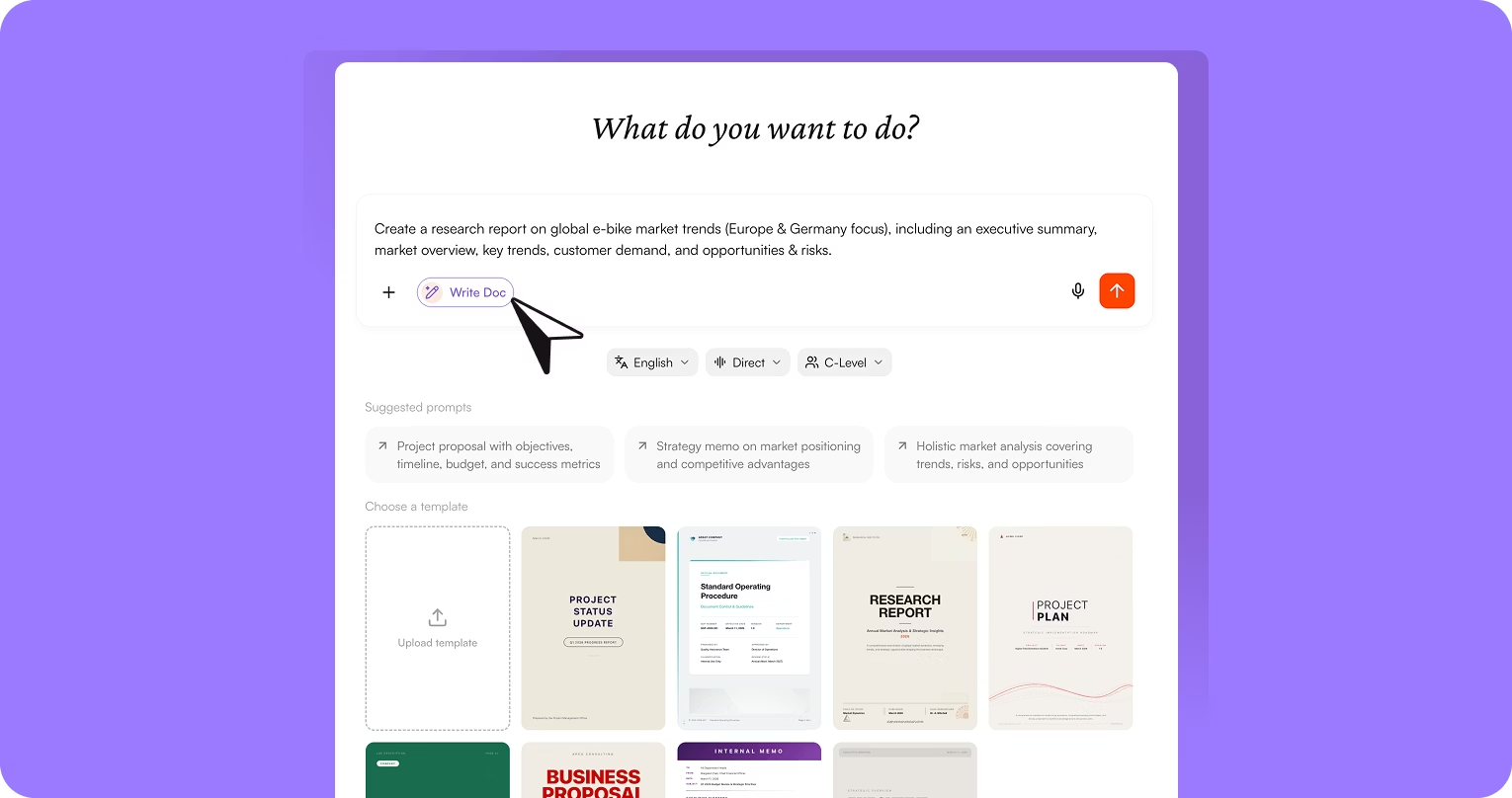
Upload your own templates or use built-in templates.
Upload your company's document templates to define how content should look and feel. You set the standard once, the AI follows it every time.
Define language, tone, and target audience before generating.
Tell the AI who the document is for, what it should accomplish, and in which language. A customer-facing research report reads differently from an internal strategy paper.
Documents generated from company knowledge.
The AI draws from your company's Corporate Brain; documents, meetings, decisions, and shared data, when generating content. It does not start from a blank prompt. It starts from what your team already knows.
A fully integrated editor for refinement.
Edit content, adjust structure and formatting, customize layout and visual elements, upload or generate images, and modify box styles. All directly inside nuwacom.
Version control built in.
Save versions at any point. Every version stays traceable and accessible. No emailing files back and forth. No wondering which draft is current.
Export to DOCX or PDF in one click.
No lock-in. No proprietary formats. Your team can distribute documents as Word files or PDFs — the AI-powered creation process happens inside nuwacom, the final file works anywhere.
Connected to slides, images, and workflows.
Documents live in the same workspace as presentations, AI-generated images, and automated workflows. Content flows between features without exporting or importing files. A chart created for a report can appear in a presentation. Research done for a document can feed directly into a slide deck.
Standalone AI writing tools generate text from prompts. nuwacom generates documents from company knowledge. That is the difference between a generic draft and a document your team can actually use.
How does nuwacom compare to other AI document creation tools?
Capability | Standalone AI Writing Tools | nuwacom Documents |
Template support | None or basic formatting | Upload your own corporate templates |
Company data access | None — prompt-based only | Connected to Corporate Brain |
Tone / audience targeting | Manual prompt engineering | Set voice, audience, language before generating |
Corporate design application | None | Automatic from Brand Kit and templates |
Integrated editor | Separate export/import | Built-in, edit in place |
Version control | Manual file management | Built-in, every version traceable |
Export formats | Copy-paste to Word | DOCX, PDF — one click |
Context memory | None between sessions | Corporate Brain remembers everything |
Data sovereignty | Varies, often US-hosted | 100% EU-hosted, GDPR compliant |
Works with slides, images, workflows | No — separate tools | Integrated in the same workspace |